

Overview
The Real Estate Professional Matchmaking System allows you to find and connect with real estate professionals directly from a property search—without cold calls, spam, or pressure.
Instead of filling out service forms or submitting your contact information upfront, you stay in control. You browse professionals tied to a specific property, choose who you want to work with, select the service you need, and decide when the relationship starts.
Everything begins with a property search.
What Problem Does This Solve?
Traditional ways of finding real estate professionals often lead to:
- Unwanted calls and messages
- Professionals who don’t understand your property
- Little clarity or trust before first contact
The Real Estate Professional Matchmaking System solves this by letting you choose the professional first, directly from the property you are viewing.
How to Use the Matchmaking System (Step-by-Step)
Step 1: Log In to Deal Connect
Open the Deal Connect app or web platform and sign in to your account.
Step 2: Search for a Property
All professional matching begins with a property search.
Enter an address, neighborhood, or area you are interested in.
Once you open a property, you’ll see professionals who work in that area.
Service requests only happen after you select a professional to connect with.
Step 3: View Professionals for That Property
Professionals are shown based on:
- Property location
- Category of service
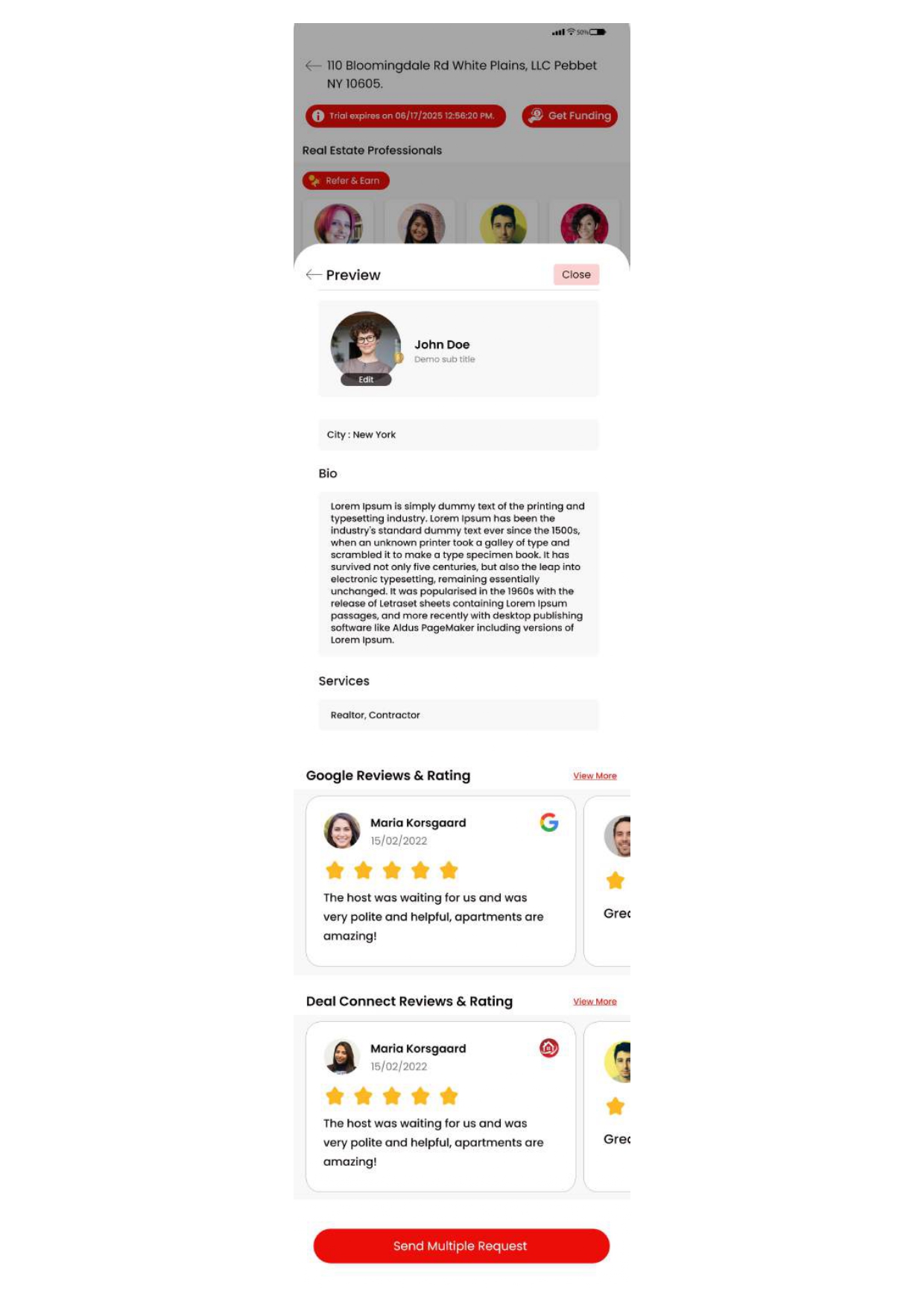
You’ll see professional profiles that may include:
- Profile picture
- About Us section
- Services offered
- Coverage areas
- Verification status (optional)
- Reviews and reputation indicators
Verification is an added benefit, not a requirement. Professionals may choose to become verified, but all professionals can appear in results.
Step 4: Compare and Choose
Browse profiles at your own pace.
You choose:
- Which professional to work with
- Which service you need
- When you want to start the conversation
No one contacts you until you decide.
Step 5: Start the Conversation
Once you select a professional and request a connection, the professional will reach out when they have availability.
This ensures conversations start with clear intent, proper timing, and shared context around the property.
Visuals
- Screenshot of a property search result
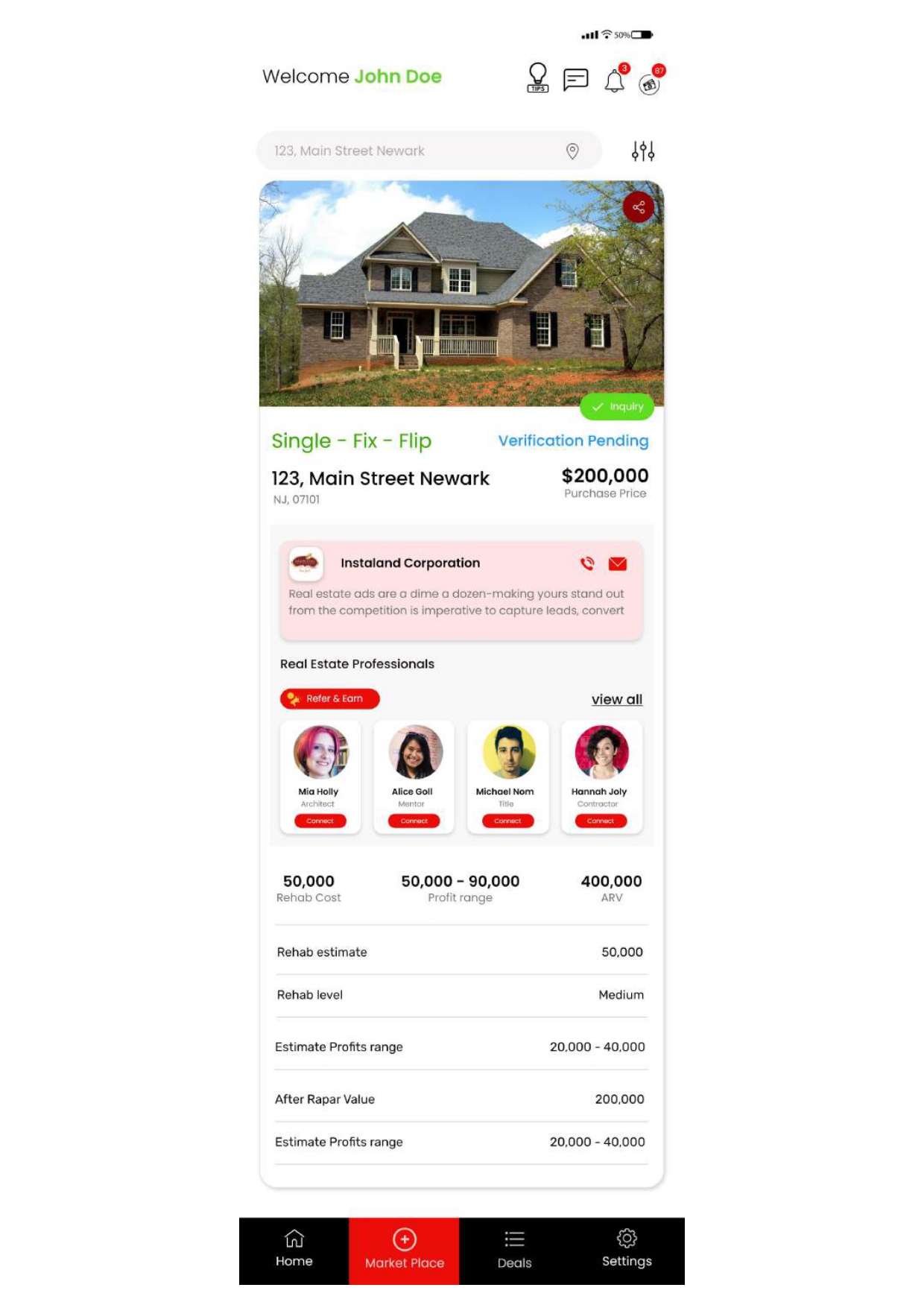
- Screenshot of a property page showing professionals by category

- Screenshot of a professional profile
Tips & Troubleshooting
Not seeing professionals?
- Make sure the property location is correct.
- Try browsing different service categories.
Seeing both verified and non-verified professionals?
- Verification is optional. Use it as an extra trust signal, not a requirement.
Not ready to talk yet?
- You can browse profiles freely without starting a connection.
How This Is Different From Lead Forms
- You are not submitting a service request upfront
- You are not agreeing to immediate outreach
- You are choosing the professional before any contact occurs
The relationship starts only when both sides are ready.
Need Help?
If you need assistance:
- Visit the Help Center inside the Deal Connect app
- Email support at [email protected]
- Use in-app chat for account or matching questions
Summary
The Real Estate Professional Matchmaking System gives you control, clarity, and confidence when choosing real estate professionals. Everything starts with a property, and every connection happens on your terms.
You choose the professional.
You choose the service.
You choose the timing.
This is not lead generation.
This is community-driven real estate matchmaking.